
ON THIS PAGE
SmartSpace.ai Workflows & Use Case Setup
Guide to setting up use cases in SmartSpace.ai: Data space creation, workspace configuration, access control, and testing for precise contenSmartSpace.ai Workflows & Use Case Setupt generation.
Workflows – Overview of the Default Flow
Overview of the Default Flow
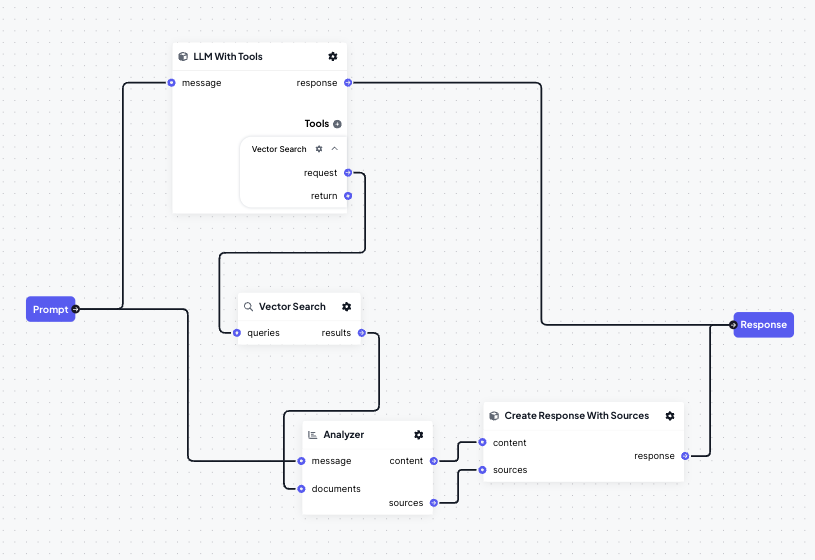
When a new workspace is created in SmartSpace, a default flow is automatically implemented. This flow is designed to provide a basic yet powerful starting point, integrating several essential blocks to handle typical user queries efficiently. The default flow includes:
- Prompt Input: The flow begins with a user message or query.
- LLM With Tools Block: This block processes the input, determining whether to handle the request directly or use additional tools for more complex queries.
- Vector Search Tool: If the LLM block requires additional data, it invokes the Vector Search tool, which searches the connected DataSpaces for relevant information.
- Analyzer Block: The results from the Vector Search are passed to the Analyzer, which synthesizes a response by combining the original query with the search results.
- Create Response with Sources Block: This block formats the final response, including references to the sources used, and sends it as the output.
This default flow is ideal for general-purpose queries but can be modified or expanded to fit more specific use cases.
You may find these additional articles on Workflows useful:
