ON THIS PAGE
SmartSpace.ai FAQ, Bugs and Feature Requests
Easily navigate FAQs, log bugs, and suggest features to enhance your experience with prioritized, efficient support.
How do I add a new user to SmartSpace.ai
Q: How do I add a new user to SmartSpace.ai?
A: Adding a new user or group to a Workspace, using the SmartSpace.ai Admin Portal, gives them access to query all the data in the Dataspace(s) connected to the Workspace. Users and groups are retrieved from Azure Entra (formerly Active Directory) connected to SmartSpace.ai. There are three user types available in SmartSpace.ai:
- User – this is an individual in your organisation.
- Group – a group in Azure Entra (formerly Active Directory) is used to collectively manage users that all need the same access and permissions to resources. NB: When you add a group to a Workspace all users in that group will have access to query all the data in the Dataspace(s) connected to the Workspace.
- Service Principal – is a service account that is used to connect APIs into the Workspace.
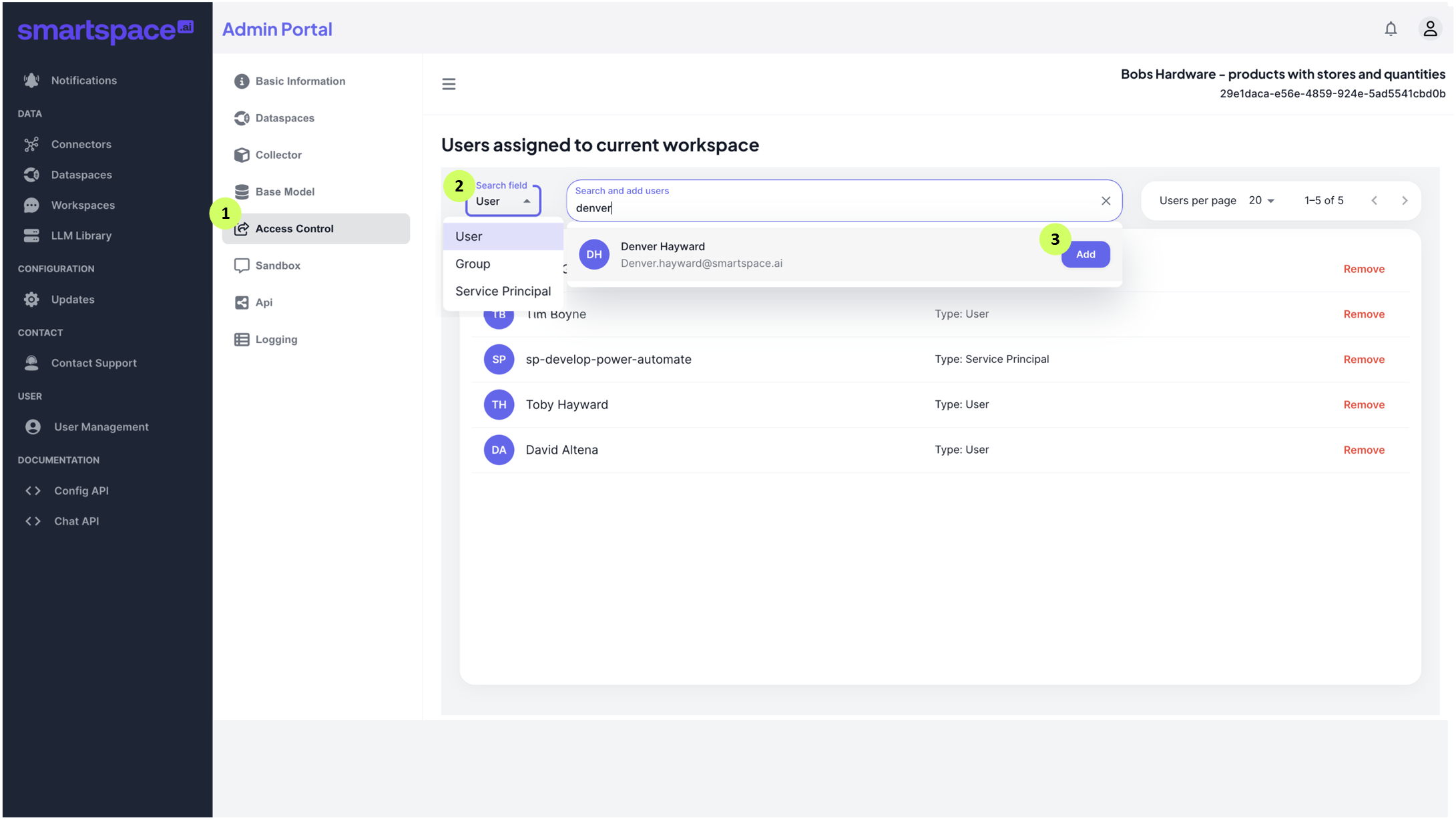
Follow the steps below to add users to a Workspace:
- Open your Workspace in the Admin Portal and select Access Control.
- Select the User type in the Search Field dropdown.
- Enter the name of the person, group or service account in the ‘Search and add users’ field and select ‘add’.